Drag and Drop
Drag and drop is not a widget. draggable, dragPayload, and dropTarget are three universal
props present on all 70 widgets, alongside their matching dragStarted/dragEnded/dragOver/
dropped events. Any box, label, button, or row can be a drag source, a drop target, or both.

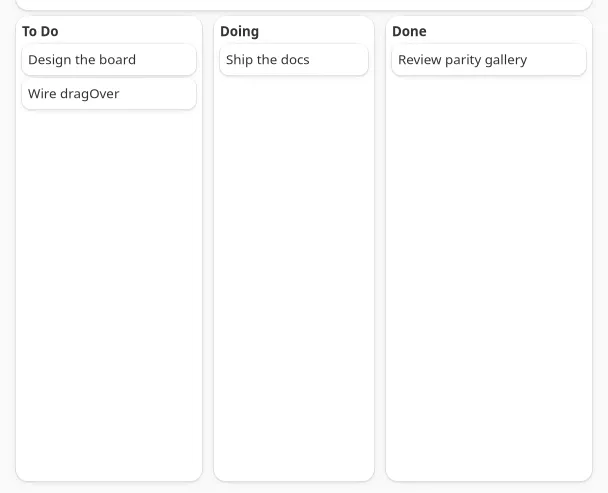
Both screenshots show the board at rest rather than mid-drag: GTK cannot synthesize pointer input
for a live drag (-32003 inputUnsupported), and the AppKit drag RPC posts an entire gesture in one
marshal, so by the time it returns the drop has already landed.
type ColumnId = "todo" | "doing" | "done";
<box dropTarget cssClasses={hovered ? ["card", "accent"] : ["card"]} onDragOver={(e) => setHover({ column: "todo", x: e.data.x, y: e.data.y })} onDropped={(e) => moveCard(e.text, "todo")}> <box draggable dragPayload={card.id} onDragEnded={() => setHover(null)} cssClasses={["card"]} > <label text={card.title} /> </box></box>;| Prop | Type | Default | Applied | Notes |
|---|---|---|---|---|
draggable |
bool | false |
createAndUpdate | Makes the widget a drag source. |
dragPayload |
string | "" |
createAndUpdate | The app-defined string carried by the drag. Read fresh at drag start, so changing it before the next drag is enough; no need to remount. |
dropTarget |
bool | false |
createAndUpdate | Makes the widget a drop target. |
A widget can be draggable and dropTarget at once, useful for reordering a list where every row
is both.
Events
Section titled “Events”| Event | Fires on | Handler | Payload |
|---|---|---|---|
dragStarted |
the draggable widget | onDragStarted |
{ text }, the widget’s own dragPayload |
dragEnded |
the draggable widget | onDragEnded |
none, fires whether the drag was dropped or cancelled |
dragOver |
the dropTarget widget | onDragOver |
{ text, data: { x, y } } |
dropped |
the dropTarget widget | onDropped |
{ text, data: { x, y } } |
text on dragOver/dropped is the source widget’s dragPayload, echoed to whichever target the
pointer is currently over. x/y are in the target widget’s own coordinate space, top-left
origin, the same on both backends: hit-test a drop zone against its own bounds without knowing
which platform drew it.
There is no dragLeave event. To un-highlight a target the pointer has left without dropping,
clear the highlight from the source’s dragEnded instead, since that always fires once the drag
concludes, dropped or not. The kanban board below does exactly this: a column’s accent highlight
and its live x/y readout both come from one piece of state that dragOver sets and dropped/
dragEnded clear.
Platform notes
Section titled “Platform notes”- External drags don’t reach these events on macOS. A drag that starts in another application
(a file from Finder, text from Safari) never fires
dragStarted/dragOver/droppedhere. That traffic stays on the existingapp.onFileDropevent from the System Capabilities API.draggable/dropTargetare for drags between your own widgets. - A control with its own mouse-tracking loop may not start a drag on macOS. The drag side is
an
NSPanGestureRecognizerattached to the host view.NSButtonand a few other AppKit controls run their own internal mouse-tracking loop on mouse-down that can consume the event before the recognizer sees it, sodraggableon a<button>is not guaranteed to start a drag. Wrap the button’s content in a<box draggable>instead, or make a plain<box>/<label>the drag source and put the button elsewhere in the row. - GTK payload is a real string on the pasteboard. The drag rides as a
GdkContentProvidercarrying a plain string, so it also interoperates with anything else on the desktop that accepts text, not only other NativeDesktop drop targets. dragOverfires as soon as the pointer enters a target, before any movement. Both backends preload the payload so a target can hit-test and highlight on the very first frame the pointer is over it, rather than only once the user has already moved inside it.
See examples/parity/main.tsx’s Drag and Drop section: a three-column kanban board where dragging
a card moves it between columns in real state, dragOver highlights the hovered column, and a
label shows the live x/y.