Multi-Window
Render multiple <window> roots, typically as siblings inside a fragment, and each becomes an
independent OS window on both backends, all driven by the same Bun/React process. Windows sharing a
tabGroup prop render as one tabbed window instead; see Native Tabs.
examples/multiwindow/main.tsx is the reference app for this page.
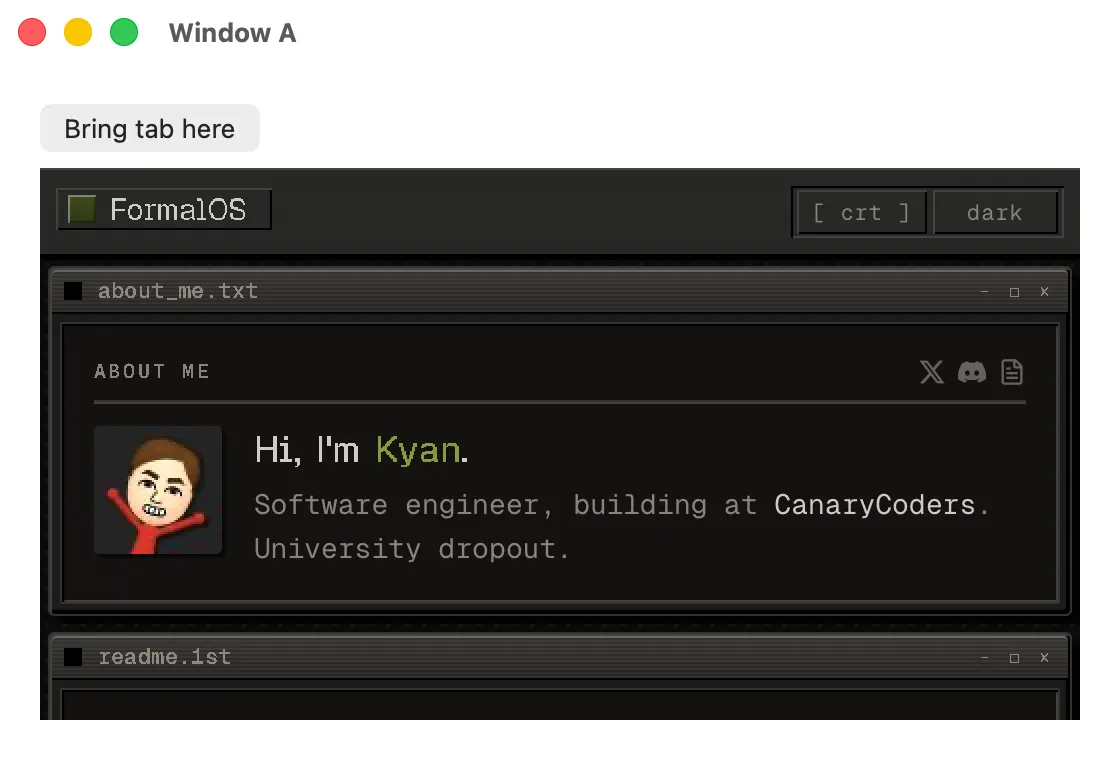
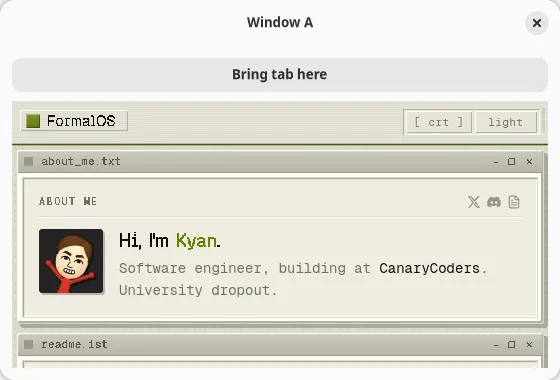
Rendering more than one window
Section titled “Rendering more than one window”import { render } from "@nativedesktop/react";
function App(): React.ReactNode { return ( <> <window title="Window A" defaultWidth={560} defaultHeight={380}> {/* … */} </window> <window title="Window B" defaultWidth={560} defaultHeight={380}> {/* … */} </window> </> );}
await render(<App />);The core reconciler (src/tree.zig) pools window handles by node id, so a --hot edit rebinds
existing windows instead of reopening them, and a genuinely new <window> node opens a fresh OS
window. Every window is rendered by the same tree in one process, so sharing state between them is
ordinary React state and closures. No IPC, unlike a multi-window Electron app where each window is
its own renderer process.
Automation, the crash overlay, window chrome, and the ACL are all per-window correct:
- A node’s geometry and visibility, and therefore the bounds
getTreereports plusclick,setValue,type,scroll, andwaitFor’srefVisiblecheck, resolve against that widget’s own window rather than a global. GTK usesgtk_widget_get_root(); AppKit resolves the live content view ofview.window. screenshotrenders whichever windowparams.windownames.- A JS crash brings down every window’s UI at once, so the crash overlay paints on every open window and clears on every window on restart.
- Each
<toolbarview>and headerbar attaches to its own owningNSWindow/GtkWindow, not whichever window was created last. core:window.createis ACL-gated per target window id, so a grants manifest can scope window creation to a specific window. A window-0 grant still applies everywhere, matching the default policy.
getTree scopes per window too: pass window (a Window node ref) and the snapshot covers that
window’s subtree. Without it, the RPC returns the root/first window’s tree, with every other
window’s nodes attached as orphans directly under that root; each orphan’s own geometry is still
correct, resolved against its own window as above.
Moving a widget between windows without reloading it
Section titled “Moving a widget between windows without reloading it”Plain React cannot express this move safely. A node under a new parent is a different position in
the fiber tree, so React unmounts the old instance and mounts a fresh one, which the host turns into
a native destroy and create. For a <webview> that throws away the WKWebView/WebKitGTK instance and
rebuilds it: the page reloads and scroll position, form input, and JS state go with it.
Two functions from @nativedesktop/react (packages/react/src/renderer.ts) work around it:
function createPool(): Poolfunction createPortal(children: ReactNode, pool?: Pool): ReactPortalfunction moveNode(node: NdNodeRef, toParent: NdNodeRef, before?: NdNodeRef | null): voidcreatePortal(children, pool?)renderschildreninto a stable, off-window pool instead of wherever it’s called from in the tree, but its React fiber stays at that call site. Because the fiber’s position never changes, React never unmounts it, no matter which window later shows it. If you omitpool, a single process-lifetime pool shared across the app is used; callcreatePool()yourself (once, at module scope or in a ref, never inside render) if you want more than one.moveNode(node, toParent, before?)relocates only the live native widget undertoParent(optionally positioned before another node); it never touches the React tree.nodeandtoParentare what a host-elementrefresolves to (NdNodeRef, the same handle Imperative Commands & Refs uses).
A node rendered via createPortal is a live native widget the moment it mounts. It is attached to
no window until the first moveNode call places it somewhere visible.
import { render, createPortal, moveNode, useEffect, useRef, useState } from "@nativedesktop/react";import type { NdNodeRef } from "@nativedesktop/react";
function App(): React.ReactNode {  const tab = useRef<NdNodeRef<"webview">>(null);  const slotA = useRef<NdNodeRef<"box">>(null);  const slotB = useRef<NdNodeRef<"box">>(null);  const [host, setHost] = useState<"A" | "B">("A");
  function show(slot: NdNodeRef<"box"> | null, name: "A" | "B") {    if (tab.current && slot) {      moveNode(tab.current, slot);      setHost(name);    }  }
  return (    <>      {/* The tab, pinned in the pool. Its React position never changes, so it's          never unmounted when it moves between windows. */}      {createPortal(        <webview ref={tab} url="https://example.com/" style={{ hexpand: true, vexpand: true }} />,      )}
      <window title="Window A" defaultWidth={560} defaultHeight={380}>        <box ref={slotA} orientation="vertical">          <button label="Bring tab here" onClick={() => show(slotA.current, "A")} />          {host !== "A" && <label text="(tab is in Window B)" />}        </box>      </window>
      <window title="Window B" defaultWidth={560} defaultHeight={380}>        <box ref={slotB} orientation="vertical">          <button label="Bring tab here" onClick={() => show(slotB.current, "B")} />          {host !== "B" && <label text="(tab is in Window A)" />}        </box>      </window>    </>  );}
await render(<App />);
Render the portal at a stable position (one per movable item, keyed by its own id, at or near the app root) so it outlives any single window it might currently be showing in.
Why it is imperative
Section titled “Why it is imperative”moveNode breaks from the declarative model the rest of the toolkit follows because the thing being
preserved, a widget’s live native state, is exactly what React’s model would destroy. It rides the
same widgetCommand channel as sendCommand under a
reserved command name, into a reparent_child op on the host ABI vtable, so it reaches the native
widget through the same C-ABI seam as every other host operation with no protocol or schema change.
GTK brackets the move in a g_object_ref/unref pair; AppKit takes a retain across it. Either way
the widget is never transiently deallocated mid-reparent.